


CastChat - Match & Voice Chat
4.85.63K Reviews
App Specs
- Version
- 2.35.1-260512529
- Updated On
- License
- Free
- Downloads
- 10,000,000+
- Developer
- Guru AI Lab
- Categories
- Communication
- Platform
- Android
Screenshots

 Analysis by AppCompare
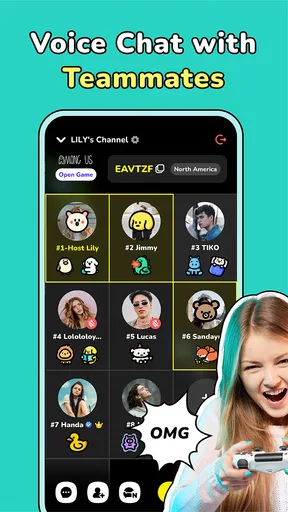
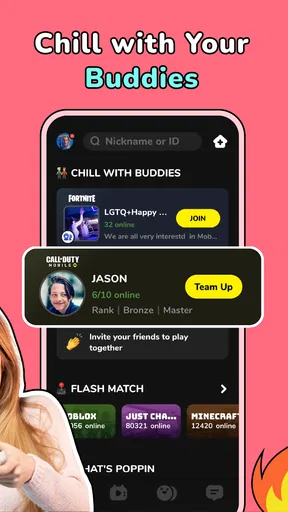
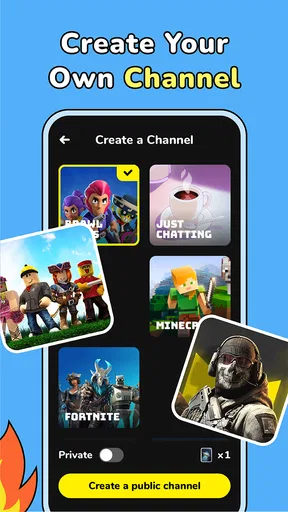
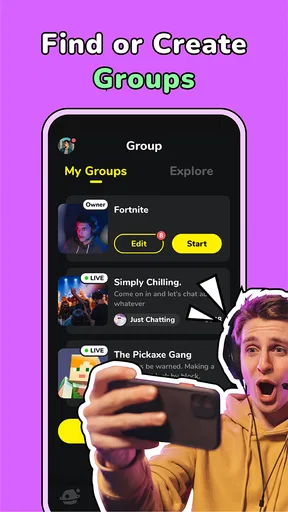
I found CastChat - Match & Voice Chat most interesting when I stopped treating it as another general-purpose messenger and used it for one specific job: finding people who want to play and keeping the conversation together while we do it. That focus changes the experience. Instead of asking friends one by one whether they are available, I can look for a group, join a conversation, and move from text to voice when the session actually starts.
That makes it a communication app with a clear gaming purpose rather than a replacement for every chat service on my phone. Guru AI Lab has built it for people who want teammates, casual company, and group discussion around games. It is free to install, carries a Teen content rating, and supports devices running Android 8.0 or later. The app has reached over 10 million installs, with a 4.8 average from around 56 thousand ratings, so it is clearly being used at a meaningful scale.
Why the teammate-and-voice focus matters
The useful capability here is not simply that CastChat lets people type messages. Plenty of apps already do that. The difference is the way the app puts the search for teammates and the live group conversation close together. For a player who regularly has trouble filling a squad, that can remove several small obstacles: finding interested people, deciding where to talk, and keeping the group in one place once everyone is ready.
I see the strongest value in games where cooperation depends on timing. A text message can help arrange a session, but voice is much more practical once the match begins. Short instructions, warnings, and quick decisions are easier to communicate aloud than through a stream of typed messages. Even in a relaxed session, speaking can make a temporary group feel less awkward than exchanging short written replies with people I have just met.
The app’s broad support for games is also important. I would not approach it as a tool tied to one particular title or one narrow player community. Its appeal is that the communication layer can sit beside different games. That makes it useful for someone whose gaming habits change often, although it also means the quality of the experience depends heavily on the people available in the relevant community at that moment.
There is a subtle distinction between “find teammates” and “find a permanent gaming community.” CastChat is better suited to the first need. I can imagine using it to assemble a group for an evening, meet players with similar interests, or join a conversation when my usual friends are offline. I would be more cautious about expecting it to replace a long-established community with its own deep history, moderation culture, and carefully organized channels.
What the app changes in a normal gaming routine
My usual alternative would be to use a general chat app, a game’s built-in social tools, or a community platform that is not primarily designed around quick teammate matching. Those options may be better when I already know exactly who I want to contact. CastChat becomes more attractive when the problem is discovery: I want to play now, but my regular group is unavailable.
Worth Reading Before You Choose

EA SPORTS FC Mobile 26 Is a Bigger Football Game, but It Takes Time

Flipboard Shows What News Apps Must Do Beyond the Feed

Switching to Android Auto Means Rethinking Your Driving Routine

Google Calendar Makes a Crowded Week Easier to Manage

Ludo King Makes the Most of the Minutes Between Plans

Baby Panda World Brings Quick Play to Modern Phones, but Its Game Library Feels Busy
That distinction is useful before installing it. If your only requirement is a private conversation with two close friends, a familiar messenger may feel simpler. If you need a place where gaming-related conversations and voice interaction are central, CastChat has a more direct purpose. I would choose it for the gap between solo play and a stable friend group.
The app is developed by Guru AI Lab and is currently listed as version 2.35.1-260512529. I mention the version because it is helpful when checking whether your device is compatible or when troubleshooting an experience that differs from another user’s. The Android requirement is relatively accessible, but older hardware can still affect how comfortable voice communication feels, especially when a game is already demanding.
How I would use it in practice
A realistic evening might look like this: I finish work, open the game I want to play, and realize that playing alone is less appealing than usual. Rather than sending several messages and waiting for replies, I use CastChat to look for a suitable group conversation. Once I find people who are also ready to play, text is useful for the first details—what everyone wants to do, whether the group is casual, and when to begin.
When the session starts, voice becomes the more valuable part. I can keep my attention on the game instead of repeatedly looking down to read or type. If the group is temporary, that is fine; the app does not need to become a permanent social commitment to be useful. This is one of the strongest practical advantages: it can support a short gaming session without requiring me to build an entire community first.
I would recommend setting expectations early. A quick written message about the kind of session I want can prevent a mismatch later. For example, a relaxed group and a highly competitive group may both be looking for players, but they are not offering the same experience. CastChat can help bring people together, yet I still have to communicate clearly and decide whether the group is a good fit.
Another useful habit is to keep the first interaction focused. I would avoid sharing personal details simply because a conversation feels friendly. The app is rated Teen, which is a reminder that the audience can include younger users and that public or semi-public conversations deserve normal online caution. I would leave a group that becomes hostile, pressuring, or uncomfortable rather than trying to rescue the conversation.
Voice chat also changes the social dynamics. It can make coordination faster, but it can expose differences in volume, background noise, speaking style, and patience. A group that seems pleasant in text may feel very different once everyone is talking at once. I treat the first voice session as a trial rather than assuming that every promising conversation will work well in real time.
For that reason, I would use text as a screening stage and voice as the working stage. First, I would look for signs that the group is organized and respectful. Then I would join the live conversation only when the plan is clear enough to justify it. This small workflow makes the app feel less chaotic and helps me avoid spending an entire evening in a room that never actually starts a game.
Small choices that improve the experience
One non-obvious trade-off is that fast matching is not the same as good matching. The quickest available group may not be the best one for my mood, skill level, or preferred pace. I get more value when I spend a little time reading the tone of a conversation instead of joining the first active option.
A second insight is that voice is most useful when the game itself leaves little room for typing. In a slower or highly casual game, text may be enough, and opening a separate voice conversation can feel unnecessary. In a coordinated session, however, the same feature becomes the reason to choose CastChat over a normal messaging app.
A third practical point is that the app can serve as a bridge, not just a destination. I could meet a group there for one session, discover that we work well together, and then decide whether continuing elsewhere makes sense. That keeps the initial commitment low. It also means I should judge CastChat by how well it helps me start useful conversations, not only by whether it becomes my permanent communication home.
I would also pay attention to the difference between a busy room and an active one. A conversation can contain many participants without producing a clear plan. For a player who wants to begin quickly, a smaller group with a specific purpose may be more valuable than a crowded space full of disconnected messages. The app gives me access to potential teammates, but choosing the right social setting remains part of the work.
The best scenario for CastChat
The clearest use case is the player who has time for a game but lacks a dependable group at that exact moment. Maybe friends are busy, schedules do not line up, or the game is more enjoyable with several people. CastChat addresses that temporary problem better than a private messenger because it starts from the need to connect around play.
It is also a good fit for someone who enjoys meeting new players but does not want to commit to a large, permanent community. A short voice session can be enough. I can join, play, talk, and leave without turning every interaction into a long-term social obligation. That flexibility is especially appealing when my available gaming time changes from day to day.
The app may help players who move between different games as well. A single-purpose community can be excellent for one title but less useful when interests change. CastChat’s positioning around broad game support makes more sense for people who do not want to maintain a separate communication routine for every game they play.
However, I would not recommend it as the first choice for someone who already has a well-organized private group and only needs reliable, direct calls. In that situation, the discovery side may add steps rather than remove them. A regular messenger or an established community platform could be more convenient because the contacts, habits, and expectations are already in place.
I would also hesitate to recommend it to anyone who dislikes talking with unfamiliar people. The app’s central appeal depends on social interaction, and voice chat can feel intrusive if you prefer silent cooperation. You can still use written conversation, but the experience is likely to be less distinctive if you avoid the capability that makes it stand apart from ordinary chat.
Where the trade-offs become noticeable
The biggest limitation is that CastChat cannot guarantee a compatible group. It can bring people together, but personalities, schedules, communication styles, and expectations still vary. A user looking for a very specific level of skill or a carefully managed community may need to try several conversations before finding the right fit.
There is also a privacy and comfort trade-off whenever I join conversations with people I do not know. I need to decide how much of my identity and routine I want to reveal, and I should remember that friendly gaming talk does not automatically create trust. The safest approach is to keep early conversations about the game and use the app’s social features with the same judgment I would use anywhere else online.
Voice communication can introduce friction that text does not. Noise, interruptions, unclear speech, and people talking over one another can make a session tiring. If I am playing in a shared room or at an inconvenient time, a voice-focused workflow may not suit me. In those moments, a text-based group or the game’s built-in communication tools could be the better option.
The free price lowers the barrier to trying it, but the app includes in-app purchases ranging from $0.99 to $89.99 per item. I would not assume that installing the app means I need to spend money. I would first use the core experience, understand what I actually need, and treat any purchase as optional rather than part of the basic decision to join a gaming conversation.
That price range is worth remembering for households where more than one person uses the device. A Teen content rating also means parents may want to discuss voice conversations, contact with strangers, and purchases before allowing younger users to use the app independently. I would frame it as a social communication tool, not merely as a harmless game accessory.
The app’s popularity is reassuring in one narrow sense: there is a substantial audience to draw from, and its average score is strong. Still, a large user base does not automatically mean that every game, region, language, or time of day will have equally useful conversations. My experience would depend on whether the people online match the kind of session I want at that moment.
When another option makes more sense
I would choose a game’s built-in voice system when I need the fewest moving parts during a match and already have teammates ready. I would choose a general messenger when the group is made up of people I know personally. I would choose a more structured community service when I need long-term organization, persistent discussion, or a carefully maintained group identity.
CastChat sits between those choices. It is more discovery-oriented than a private messenger, more socially flexible than a fixed friend list, and more immediately focused on playing than a broad community platform. That middle position is its strength, but it also explains why it may feel unnecessary to users whose communication needs are already solved elsewhere.
My advice is to judge it after a few real attempts rather than after one quiet session. Try it at the time you normally play, search for the kind of group you would genuinely join, and see whether the move from text to voice feels natural. If the available conversations consistently lack the right tone or activity, no amount of enthusiasm about the concept will make it the right tool for you.
Who gets the most from it
The best audience is the flexible player who wants companionship without needing a permanent team. If I often think, “I want to play now, but nobody I know is online,” CastChat directly addresses that moment. Its teammate-finding and group voice focus can turn an isolated session into a shared one with less planning than starting a new community from scratch.
It is also well suited to players who enjoy trying different games and meeting people through them. The app’s communication purpose is broad enough to support that changing routine, while the voice element gives new groups a faster way to coordinate once they decide to play together.
Less suitable are users seeking a private, tightly controlled contact list, people who avoid voice communication entirely, and players who expect every interaction to be organized around a permanent team. Those users may be happier with a familiar private messenger, a game-specific system, or a more structured community platform.
After using it as a bridge between “I am alone” and “we are ready to play,” I see the app’s value clearly. It does not eliminate the uncertainty of meeting strangers, and it cannot replace good judgment or a reliable friend group. What it does well is make the first step easier: finding a possible group, starting the conversation, and moving into voice when cooperation matters.
My recommendation is simple: try CastChat if your main problem is finding people to play with right now. The free entry point makes that experiment easy, and the strong user rating suggests many people find the idea worthwhile. Just keep your expectations practical. It is most effective as a flexible teammate and voice-chat hub, not as a universal replacement for every communication app you already use.
Pros
- Quickly find voice-chat rooms based on games and shared interests.
- Live conversations feel more engaging than text-only community apps.
- Useful for meeting players from different regions and gaming communities.
- Room discovery makes it easy to join ongoing discussions without planning.
- Profiles and social features encourage continued interaction with new contacts.
Cons
- Public voice rooms can vary widely in moderation and conversation quality.
- Some communities may feel crowded or difficult for newcomers to enter.
- Voice chat can consume noticeable battery and mobile data during long sessions.
- The app may require microphone permissions for its main social features.
- Interactions with strangers require caution
- especially when sharing personal details.
FAQs for CastChat - Match & Voice Chat
What is CastChat - Match & Voice Chat used for?
CastChat - Match & Voice Chat is a social communication app designed for meeting people, joining conversations, and participating in voice-based communities. Users can discover profiles, match with other members, send messages, and enter voice chat rooms based on shared interests. It is aimed at casual social interaction and community building rather than traditional dating alone, so the experience can vary depending on the rooms and users available in your region.
Is CastChat - Match & Voice Chat free to download and use?
The app can generally be downloaded without an upfront purchase, and some communication and discovery features may be available for free. However, CastChat may also include optional in-app purchases, premium benefits, virtual items, or other paid features. Before confirming a purchase, check the price displayed in the Google Play Store or Apple App Store, review the subscription terms, and remember that deleting the app does not automatically cancel an active subscription.
Does CastChat require a microphone, camera, or personal information?
The microphone is important if you want to participate in voice rooms or speak with other members, while camera access may depend on the features you choose to use. The app may also request account details such as a nickname, profile image, age information, or login credentials. Grant only the permissions that are necessary, review the privacy policy, and avoid sharing your address, financial details, passwords, or other sensitive information with people you meet.
Is CastChat safe for teenagers and younger users?
Voice and social chat apps can expose users to strangers, mature conversations, unwanted messages, or inappropriate behavior, even when moderation tools are available. Parents should check the app’s age rating, privacy settings, and community guidelines before allowing use. Younger users should keep profiles private where possible, avoid moving conversations to unknown platforms, block or report suspicious accounts, and never agree to meet someone from the app without trusted adult supervision.
How can I block or report someone on CastChat?
If another user becomes abusive, sends unwanted messages, impersonates someone, or behaves inappropriately in a voice room, use the profile, chat, or room menu to look for blocking and reporting options. Save relevant evidence when appropriate, then report the account through the available in-app tools. Blocking can limit further contact, but serious threats, fraud, or illegal activity should also be reported to local authorities and the relevant app-store support team.


